IP Address Lookup vs Domain Location – What’s the Difference and Why It Matters Published: 18 May, 2026
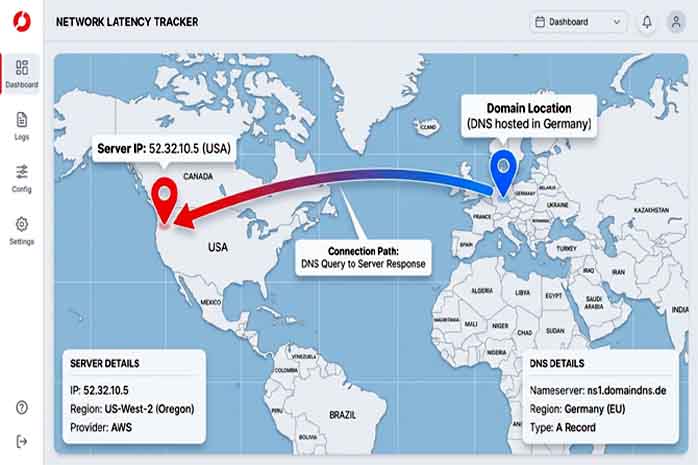
If you’ve ever used a “Where is this website hosted?” tool, you might have noticed that different tools give different answers. One says the server is in Virginia, another says London, and a third shows Singapore. Who’s right? The answer lies in understanding the difference between IP address lookup and domain location – two related but distinct concepts.
What is an IP Address Lookup?
An IP address is like a postal address for a device connected to the internet. Every server, computer, smartphone, and router has at least one IP address. When you perform an IP address lookup, you’re asking:
“Where physically is this IP address located?”
This lookup returns:
-
Country, region, city
-
Latitude and longitude (approximate)
-
ISP (Internet Service Provider)
-
ASN (Autonomous System Number)
-
Connection type (residential, business, mobile, hosting provider)
IP geolocation databases (like MaxMind or IP2Location) map IP ranges to physical locations. They’re accurate at the country level (95%+) and moderately accurate at the city level (50-80%).
What is Domain Location?
A domain location is different. When you look up a domain (e.g., cheapname.top), you’re actually looking up:
-
DNS server locations – Where the domain’s DNS records are hosted
-
Website hosting location – Where the actual web server is (this comes from the A record)
-
Registrar location – Where the domain was registered (often irrelevant)
The confusion arises because many tools call themselves “domain location checkers” but actually do an IP lookup on the domain’s A record. That’s usually correct, but there are edge cases.
The Critical Differences: A Comparison Table
| Feature | IP Address Lookup | Domain Location Lookup |
|---|---|---|
| Input | IP address (e.g., 8.8.8.8) | Domain name (e.g., google.com) |
| Output | Physical location of that IP | Server location (via A record) + DNS location |
| Accuracy | City/region level | Country level (usually same as IP) |
| Use case | Troubleshooting, security, CDN detection | SEO, hosting provider identification |
| Can be wrong? | Yes, if IP database is outdated | Rarely, unless domain uses geo-DNS |
Real-World Examples
Example 1: Netflix
-
Domain: netflix.com
-
IP lookup on
netflix.com→ Returns AWS servers in Virginia, Oregon, Dublin, etc. (they use global load balancing) -
Domain location tools might show different results depending on where you query from
Example 2: Cloudflare-powered site
-
Domain: example.com
-
The A record points to Cloudflare’s anycast IP (multiple locations worldwide)
-
IP lookup shows one location (e.g., San Francisco), but content is actually served from 200+ edge locations
Example 3: A domain with separate DNS hosting
-
Domain: myblog.com
-
A record points to server in Germany
-
NS records point to Cloudflare (global DNS)
-
Domain location tool might report “Cloudflare (USA)” if it only checks DNS, missing the German server
Why This Matters: Practical Applications
For SEO (Search Engine Optimization)
Google uses server location as a ranking signal for localized searches. If you target German users, hosting your site on a server in Germany (or using a CDN with German edge nodes) helps. Use IP lookup to verify where your host actually places you – some budget hosts lie about location.
For Website Security
Before buying an expired domain, check its historical IP addresses via WHOIS and IP lookup. If the IP was flagged for spam or malware, search engines might still penalize the domain.
For Compliance & GDPR
If your website collects personal data from EU citizens, you must comply with GDPR. One requirement is knowing where data is processed (server location). IP lookup confirms this.
For Affiliate Marketing
Some affiliate programs prohibit traffic from certain countries. Use domain location + IP lookup to ensure your landing page server isn’t in a banned region.
For CDN and Performance Analysis
Run an IP lookup on your domain from different geographic locations. If the IP changes based on where you query, you’re using geo-DNS or a CDN. That’s good for performance but confusing for manual lookups.
How to Perform Both Lookups on CheapName.top
We’ve built both tools into one interface:
IP Address Lookup
-
Enter any IP (IPv4 or IPv6)
-
Get: ISP, organization, country, region, city, coordinates, timezone
-
Bonus: See if the IP is a datacenter, proxy, or VPN
Domain Location Tool
-
Enter a domain name
-
We resolve the A record, then perform IP lookup on that IP
-
Also show DNS server locations (NS records)
-
Compare results – if they differ, you’ve found a CDN or geo-DNS setup
Advanced Use Case: Detecting Fake Local Businesses
Scammers often register domains that appear local but host offshore. For example, “londonplumbers.com” might have a .uk domain but an IP address in Romania. Run both lookups:
-
Domain location tool shows .uk domain (misleading)
-
IP lookup shows Romanian server (red flag)
Always check both before hiring an online service.
Final Thoughts
IP lookup tells you where a server lives. Domain location tells you where a domain points. Often they match, but understanding when they don’t gives you a competitive advantage in SEO, security, and digital forensics. Bookmark CheapName.top’s IP Address Lookup and Domain Location tools – they’re free, fast, and unlimited.
