What is DNS Lookup? A Complete Guide for Beginners & Webmasters Published: 18 May, 2026
Free DNS Record Lookup Tool | Check A, MX, CNAME, TXT Records | CheapName.top
The Domain Name System (DNS) is often called the “phonebook of the internet.” But that analogy, while useful, oversimplifies what DNS actually does. If you’ve ever had a website that loads slowly, emails that don’t arrive, or security warnings in your browser, chances are you’ve experienced a DNS problem. Understanding DNS lookup is the first step to fixing these issues.
What is DNS Lookup? A Simple Explanation
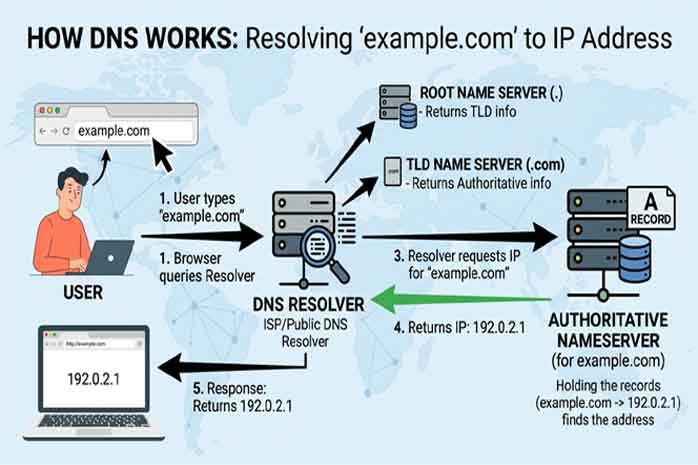
When you type www.example.com into your browser, your computer doesn’t understand words – it needs an IP address like 192.0.2.1. DNS lookup is the process of translating that human-readable domain name into a machine-readable IP address.
But here’s the catch: DNS isn’t just one record. It’s a collection of different record types, each serving a specific purpose. A full DNS lookup returns all of them.
The Most Important DNS Record Types Explained
A Record (Address Record)
The most basic DNS record. It maps a domain name directly to an IPv4 address. Without an A record, your website won’t load. Example: example.com → 93.184.216.34
AAAA Record
Same as an A record but for IPv6 addresses (the newer internet protocol). As IPv4 addresses run out, AAAA records become essential.
MX Record (Mail Exchange)
This tells the internet where to deliver email for your domain. If MX records are misconfigured, email sent to you@example.com will bounce or disappear. Most domains have multiple MX records with different priorities (e.g., primary and backup mail servers).
CNAME Record (Canonical Name)
Think of CNAME as an alias. It allows one domain to point to another domain. For example, blog.example.com might CNAME to example.wordpress.com. This is incredibly useful for CDNs, shop subdomains, and third-party services.
TXT Record (Text)
TXT records hold human-readable text, but they’re used extensively for verification and security. Common uses:
-
SPF – Says which servers can send email from your domain (reduces spam)
-
DKIM – Cryptographically signs your emails (prevents forgery)
-
DMARC – Tells receivers what to do with unauthenticated emails
-
Domain verification – Proving you own a domain to Google, Facebook, etc.
NS Record (Name Server)
These specify which DNS servers are authoritative for your domain. If NS records point to the wrong place, your entire DNS configuration is ignored.
SOA Record (Start of Authority)
Contains administrative information about your DNS zone: the primary nameserver, the admin email, serial numbers for updates, and cache timing settings.
How to Perform a DNS Lookup (Step by Step)
With CheapName.top’s DNS Record Lookup tool, you simply:
-
Enter any domain name
-
Select which record types you want (or choose “All”)
-
Click “Lookup”
Results appear in seconds, showing:
-
The record type
-
The value (e.g., IP address or mail server)
-
TTL (Time to Live – how long the record should be cached)
Real-World Troubleshooting Scenarios
Scenario 1: “My website loads but email doesn’t work”
Likely cause: Missing or incorrect MX records. Use DNS lookup to check if MX records exist and point to valid mail servers (e.g., mail.example.com or Google’s aspmx.l.google.com).
Scenario 2: “I moved my website to a new host, but visitors still see the old site”
Likely cause: Low TTL values were not set before the migration. DNS records were cached by ISPs. Use the SOA record to see the default TTL.
Scenario 3: “Google won’t verify my domain for Search Console”
Likely cause: The TXT record with the verification code hasn’t propagated. Use our DNS lookup to confirm the TXT record is published correctly.
Scenario 4: “My subdomain (store.example.com) doesn’t work”
Likely cause: Missing or incorrect CNAME or A record for the subdomain.
Advanced: Using DNS Lookup for Security
Cybersecurity professionals use DNS lookup to detect:
-
DNS tunneling (data exfiltration via DNS queries)
-
Phishing domains (check if a domain’s A record points to a known malicious IP)
-
Domain shadowing (attackers adding subdomains without your knowledge)
Why CheapName.top’s DNS Lookup is Different
Many free DNS lookup tools are slow, rate-limited, or show only basic records. Our tool:
-
Shows all common record types (A, AAAA, MX, CNAME, TXT, NS, SOA, PTR, SRV)
-
Uses smart caching for speed but always respects the record’s TTL
-
No captchas, no “wait 10 seconds,” no daily limits
-
Mobile-responsive – works perfectly on phones for on-the-go troubleshooting
Final Thoughts
DNS is invisible when it works and maddening when it breaks. Learning to perform DNS lookups gives you superpowers: you can diagnose email failures before calling support, verify hosting changes without waiting hours, and even spot security threats. Bookmark CheapName.top’s DNS Record Lookup tool – you’ll use it more than you think.
